Port Forwarding Wizard • Overview
|


 Open Port Checker: It is a utility you can use to check your external IP address and detect open ports on your connection. This utility is useful for finding out if your port forwarding is setup correctly or if your server applications are being blocked by a firewall or ISP.
  The new Online DVR/Camera Port Forwarding Service: It is a very powerful online solution for DVR/CCTV remote viewing without port forwarding setting in router. Support both Windows and Mac OSX platforms. For the scenario that you can not config router to add port forwarding, or your ISP block your port, or router port forwarding just does not work for your DVR/CCTV remote viewing, our service is the right solution that you are looking for. By using our service, you can just easily remote view your DVR/CCTV even without port forwarding.
 | Features | Lite Version | MAC OSX Version | Home Version |
Pro Version | Enterprise Version |
|---|---|---|---|---|---|
| License | Register to one computer. | Register to one computer. | 50 simultaneously connections and free upgrade for one year. Register to one computer. |
500 simultaneously connections and free upgrade for lifetime. Register up to five computers. |
No connections limit. Free service and upgrade for lifetime. Register up to all of computers in your enterprise. Support up to 5000 simultaneously connections, even support up to 10,000 simultaneously connections on a Windows Server. |
| Router Port Forwarding |  |
|
|
|
|
| TCP Port Forwarding | |
|
|
||
| UDP Port Forwarding | |
|
|
||
| HTTP Port Forwarding | |
|
|
||
| Run as Service | |
|
|
||
| Integrated Web Interface | |
|
|||
| Integrated File Sharing Tool | |
|
|||
| SSL Port Forwarding | |
|
|||
| Command line tool of port forwarding can be easily integrated with your software | |
|
|||
| Smart Route Strategies for load balance and port forwarding to multiple destinations at the same time | |
||||
| Price |
$12.95(Limited Time) |
$12.95(Limited Time) |
$24.95 |
$34.95 |
$74.95 |
| Free Trial » | Free Trial » | Free Trial » | Free Trial » | Free Trial » | |
| Learn More » | Learn More » | See How it Works » | Learn More » | Learn More » | |
 |
|
|
|
|
As the best port forwarding software, Port Forwarding Wizard support port forwarding with router, port trigger instead of port forwarding for your router, port forwarding without router, port forwarding to multiple destinations at the same time and convert port forwarding to http proxy.
If you want to learn more info about port forwarding, reverse port forwarding or reverse tunnel, you can click here to check our tech articles.
Using this powerful ports forwarding software, it will let you Infinitely ports forwarding until the destination ip address is reached. It forwards any TCP/UDP protocol. For example: HTTP, SMTP, POP, TELNET, NETBIOS and SSL. You can completely use this tool without learning.

When you try to access some remote computer, maybe this computer located in a LAN that you can't directly access or this computer are configured to deny your computer's ip address.
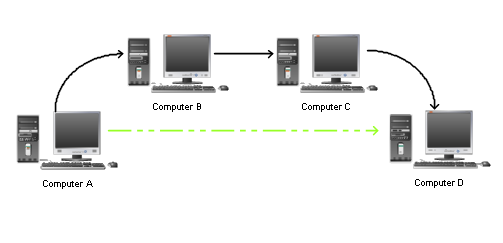
For example, Computer A is your own computer and you want to access some service located on Computer D, you must firstly access Computer B and secondly Computer C. Under this situation, maybe you need to go through a lots of computer to finally access the destination and the computers you must go through maybe run Windows, Solaris or Linux system. It will bother you so much.


Now, you can deploy this port forwarding software on those computers, no matter those computers' system. After this, you can directly access your destination easily and enjoy your easily port forwarding)
Sometime you want to access ports on computers behind firewalls, gateways, and un-configurable routers.
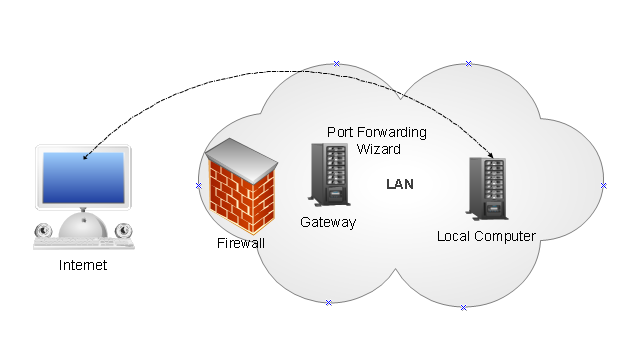
Under this situation, you can not directly access a local computer located in a LAN. But if you deploy our port forwarding software on Gateway, then now you can directly access a local computer from internet. Sometime your firewall forbid service on a LAN computer, cause this service listen on a very low port number. Using our port forwarding software, you can mapping this low port number to a high port number, then your firewall will not forbid your connecting from outside to your LAN.
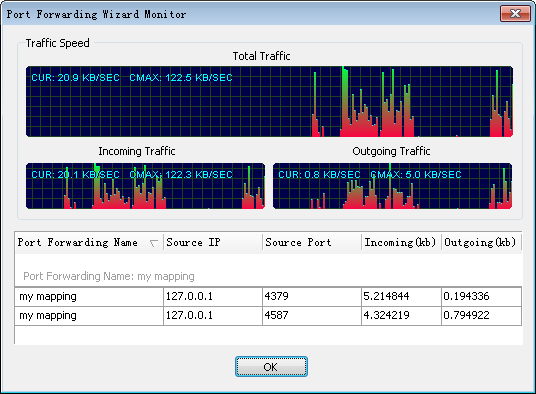
A monitor tool is integrated to let you monitor which ip has connected into our port forwarding software and how much data have been port forwarding.
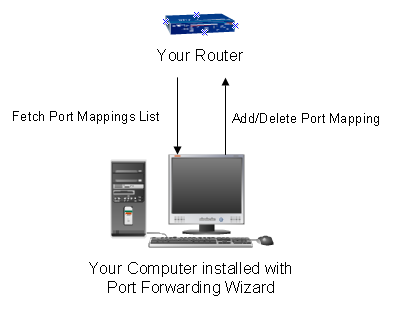
Using our port forwarding software, you can automatically manage port forwarding of your router. our port forwarding software use UPnP technology communicating with your router to view, add or delete port forwarding entry in your router. If you download movie or file from internet using azureus, utorrent or BitComet and want to a very high download speed, you must know how to operate your router to add or delete port forwarding entry. Now using our port forwarding software, you can easily to do this! Port forwarding Tester is provided too. This tester can let you check if your router has already opened the ports you want.
Port trigger is supported too. By using the integrated port trigger function on the computer that you want to router pors forwarding to, it will magically make your applications start working. This will let internet users or services can access your computer that behind your router and communicate with your computer.
Our port forwarding software integrate http proxy function. When you adding a port mapping, you get an option to choose this port mapping run like a http proxy. This http proxy port forwarding you can choose to directly access internet or connect a upstream http proxy to surf internet. Then others of your computers can share the internet connection with the computer that installed our port forwarding software. Now your computers can surf internet at the same time with port forwarding technology.
All those functions together, our port forwarding software is a very powerful port forwarding software.
| Download Trial | ||
|
||
| Frequently Asked Questions | ||

 |